Feature
QR & Posters
The problem
There was no simple way for employees to raise something.
How it helps
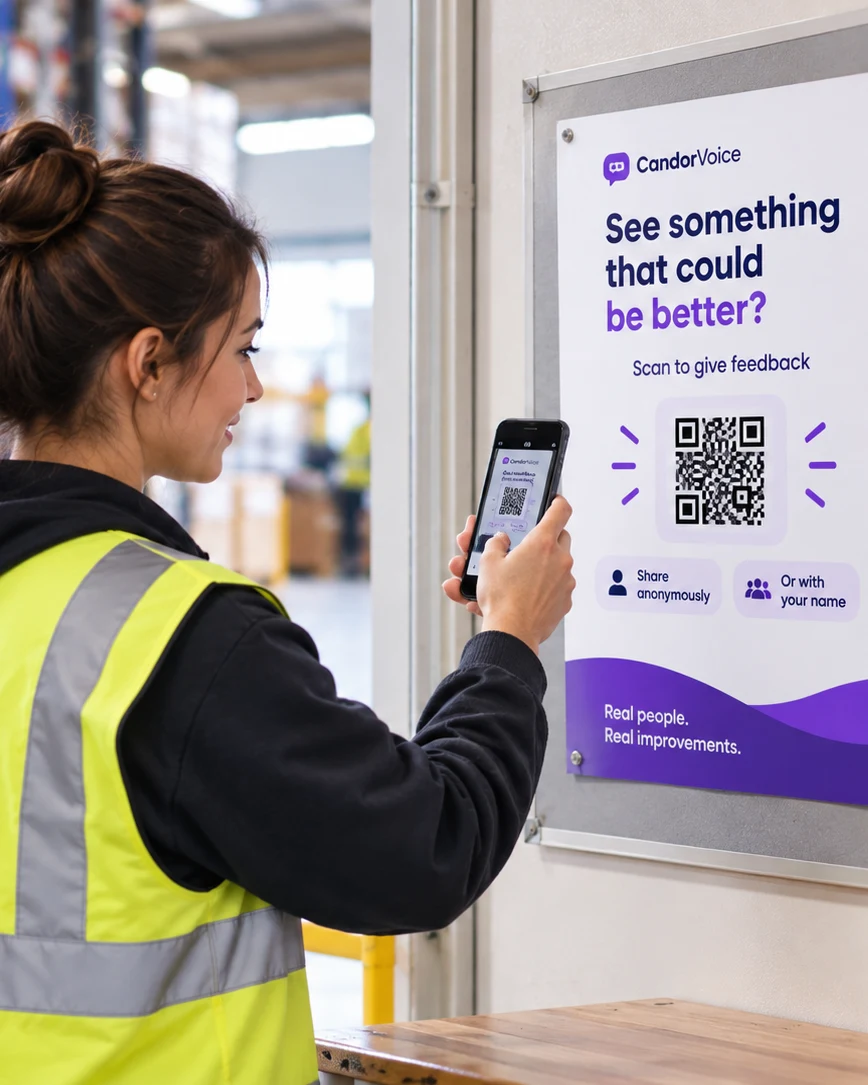
A QR poster opens CandorVoice in the employee’s browser.
Employees scan a QR code to share problems and ideas — anonymously or by name. CandorVoice helps management spot what needs attention, act, and show employees what changed.
Illustrative example
See how something an employee notices can become an Action and a visible improvement.
“The loading area is poorly lit during evening shifts. Someone could get hurt.”
Employees often see problems and better ways of working first.
They scan the QR code and share what they noticed — anonymously if they choose.
Improve loading-area lighting
“New lighting has been installed in the loading area. Thank you for speaking up.”
CandorVoice helps make speaking up an ongoing process, not a suggestion box.
WHY IT MATTERS
Encouraging a speak-up culture — where employees can share ideas, flag bottlenecks and report mistakes without fear of backlash — can improve team productivity, problem-solving and engagement.

Employees on the front line spot broken workflows, safety risks, software glitches or redundant steps long before management does. Catching these issues early can prevent costly delays.
Open communication reduces frustration and friction. Teams spend less time dealing with repeated issues and more time getting work done.
Identify hazards, near misses and unsafe practices early, helping to prevent incidents and reduce the risk of fines, lawsuits or reputational damage.
People are more likely to stay when they feel heard, trusted and valued, reducing the cost and disruption of losing experienced team members.
Ideas from the people closest to the work lead to practical improvements and smarter decisions, rather than relying on outdated habits.
With fewer recurring problems, safer ways of working and more engaged teams, work flows more smoothly and the business performs better.
How CandorVoice works
Set up your Locations, put QR posters where employees already are, and give people a simple way to speak up. Management sees what matters, takes action and shows employees what changed.
Add each workplace and download ready-to-print feedback QR posters.
Clock-in areas, staff rooms, noticeboards, break rooms and other employee spaces.
Share a problem, idea or something that is working — anonymously or by name. No employee account needed.
Spot problems early, see repeated issues and discover useful ideas from the people closest to the work.
Set a priority, owner and due date. Follow it through, then show employees what changed.
Use Polls for follow-up, Reminders to keep the channel visible, and Reports to give leadership the bigger picture.
More than a feedback box.
A repeatable way to:
listen → understand → act → show what changed → keep listening

For management
CandorVoice brings employee Feedback together across your Locations, so management can see what is happening, spot repeated problems and useful ideas, and focus attention where it matters.
See Feedback from the Locations you manage in one place — without rebuilding the picture from individual messages.
Categories and priorities help separate an urgent concern from a useful idea, recurring problem or positive feedback.
Turn an important issue into a clear next step with a priority, owner and due date — so somebody knows what needs to happen and by when.
Visible follow-through shows employees that speaking up led somewhere. Publish what changed so people can see that their Feedback was heard.
See when the same problem, mistake or inefficiency keeps coming back across shifts or Locations — and capture practical improvement ideas from the people closest to the work.
Management access can be limited to the Locations each manager is responsible for, while leadership can see the wider picture.
Use a short Poll to ask the affected team whether the change made things better — and what still needs attention.
A feedback channel can go quiet after launch. Reminders help keep CandorVoice visible and encourage employees to keep speaking up.
Reports summarise Feedback over time, so leadership gets a periodic view without rebuilding it from individual messages.
One message may be a one-off.
Repeated Feedback is a pattern.
CandorVoice helps management see the difference.
Research
Gallup’s Q12® research compares highly engaged teams with teams in the bottom quartile of engagement across millions of employees and thousands of workplaces.
Gallup Q12® Meta-Analysis · 11th edition
736 studies · 347 organisations · 53 industries · 90 countries · 3.35M employees
63%
fewer safety incidents
32%
fewer quality defects
21–51%
lower employee turnover*
78%
less absenteeism
14%
higher productivity
23%
higher profitability
Median differences between top- and bottom-quartile engagement units.
The productivity figure is measured through production records and evaluations; Gallup reports sales productivity separately.
*Turnover was 21% lower in high-turnover organisations and 51% lower in low-turnover organisations.
Independent Gallup research — not CandorVoice results.
Use of CandorVoice does not guarantee these outcomes.
View Gallup research →Everything included
The full feedback loop — from speaking up to management follow-through — is included in CandorVoice.
Enterprise & AI
The same simple feedback loop, with the controls and scale a larger rollout needs.
Store selected workspace content in your own MySQL database. An Enterprise capability.
Set up many Locations at once, invite managers and manage large rollouts from CSV files.
Export Feedback as CSV and use scheduled reports to see trends, follow-through and what needs attention.
Schedule employee reminders, and nudge managers when a Location goes quiet.
Create a poster for each Location, download packs in bulk, or print one all-Locations poster.
Ask questions across the Feedback and evidence you can access. Read-only.
Requires your own supported AI provider API key: OpenAI, Claude, Gemini or DeepSeek.
Explore CandorVoice
Explore both sides of CandorVoice with a preconfigured workspace and synthetic demo data.
See how an employee can open CandorVoice from a QR code, enter the Location PIN and share Feedback — anonymously or with their name.
Scan the code with your phone, or open it here.
Anonymous or named · No employee account required · Synthetic data resets hourly
Explore how management sees Feedback, priorities, Locations, Actions, follow-through and trends.
Writable shared workspace · Synthetic data · Resets hourly
WHY CANDORVOICE?
Because having ways to collect feedback is not the same as having a clear process for turning feedback into action.
Some employees do not know who to tell. Some are uncomfortable speaking directly to a manager or HR. Others believe nothing will happen, so they stay silent.
CandorVoice makes speaking up simple.
Employees scan a QR code, type what they want to say, and send it — anonymously or by name. No app. No employee account. No complicated process.
CandorVoice is not just another feedback tool. It is a process.
The platform helps HR and management run and oversee that process — from employee Feedback, to understanding what matters, to taking action, showing what changed, and finding better ways of working.
The traditional way
An employee sees a problem and has to decide who to tell.
With CandorVoice
Scan the QR code and speak up right away.
The traditional way
They may have to speak directly to a manager or HR.
With CandorVoice
Choose anonymous or named Feedback.
The traditional way
An email or suggestion can get lost or forgotten.
With CandorVoice
Feedback is brought together so management can see what needs attention.
The traditional way
Nobody may clearly own the next step.
With CandorVoice
Turn important Feedback into an Action with an owner, priority and due date.
The traditional way
The same problem may happen at several Locations without anyone seeing the pattern.
With CandorVoice
Reports and trends help management see repeated problems across Locations.
The traditional way
Employees often never hear what happened.
With CandorVoice
What changed shows employees what management did because people spoke up.
The traditional way
After a while, people may stop giving feedback.
With CandorVoice
Reminders and Quick Polls help keep the conversation going.
CandorVoice helps HR and management take that Feedback further — understanding what matters, deciding what needs action, assigning responsibility, showing employees what changed, and using what they learn to improve the workplace.
That last step matters. Employees may stay silent when they believe nothing will happen. When they see that Feedback is heard, acted on and followed by visible change, they have more reason to participate again.
“We raised this problem. Management listened. Something changed.”
That gives employees a reason to speak up again — and shows their colleagues that speaking up can lead somewhere.
before small problems become bigger ones.
by hearing about hazards and unsafe practices.
from the people doing the work every day.
and practical improvements.
by showing employees that their voice matters.
by reducing repeated problems, wasted time and missed opportunities.
CandorVoice doesn’t replace HR or managers.
It helps them hear what they might otherwise miss, understand what needs attention and manage a clear process from employee Feedback to action and improvement.
A strong speak-up culture is not built with one survey, one email address or one suggestion box. It grows through a repeatable process: employees speak up, management listens, action is taken, people see what changed, and the organisation keeps improving.
CandorVoice is more than a platform. It helps HR and management run and oversee a repeatable process that turns what employees see every day into action, visible improvements and better ways of working — helping build a better workplace and a better business.
Unlimited employees, one simple price. Choose the plan that fits your number of Locations.
Explore CandorVoice before your first subscription payment.
A payment card is required. There is no subscription charge during the trial. The first monthly payment follows after 14 days; cancel before the trial ends to avoid it. Cancelling a trial ends access immediately.
Billed monthly
Contact us — we’re happy to help.
CandorVoice is a frontline employee Feedback platform for organisations with one or more Locations. Put QR posters where employees work; employees scan and share Feedback; management reviews what needs attention, can turn Feedback into an Action, and can publish What changed. It becomes a repeatable habit rather than an occasional survey.
No. The QR code opens CandorVoice in the employee’s browser, and employees can submit Feedback without creating an account and without installing an app. They choose to send it anonymously or with their name.
Employees can raise a problem, an idea or something that is working well. Management reviews it, sets a Category and Priority, and creates an Action with an owner and due date when something needs to change. When the work is done, employees can be told what changed, and a short Poll can check whether it helped.
Only authorised management users. Access can also be limited to the Locations a manager is responsible for. CandorVoice includes audit history, privacy and data administration, and stronger manager authentication options such as passkeys or an authenticator app. Privacy Policy
Yes. Add your Locations, download the ready-to-print QR posters CandorVoice generates for each one, and place them where employees already are. HQ can see the wider picture while managers stay scoped to the Locations they are responsible for.
CandorVoice gives authorised management a channel to receive and follow up on serious concerns, with an audit history. It is an employee Feedback platform, not a whistleblowing or emergency service: keep using the HR, safeguarding, safety and regulatory reporting channels your policies and applicable law require. Terms of Service
Pricing is based on the number of Locations you manage, not on the number of employees, so unlimited employees are covered by one subscription. Plans are monthly subscriptions billed in advance that renew automatically until cancelled, and each plan covers the number of Locations shown. CandorVoice is delivered entirely online — there is nothing to install and no physical goods are shipped. Payments are handled by a third-party payment provider acting as Merchant of Record, which may handle payment processing, invoicing, applicable taxes and refund administration, and prices may be exclusive of applicable taxes.
You can add or remove Locations subject to the Location allowance in your current plan, and cancel at any time from the subscription area of your workspace. During a free trial, cancelling before the trial ends avoids the first subscription charge and ends trial access immediately. For a paid subscription, cancellation takes effect at the end of the paid billing period: you keep access until then, the subscription does not renew and no further charges are made. CandorVoice is a digital subscription service, so charges pay for access for the billing period; refund requests are reviewed individually, we do not promise automatic refunds or a fixed refund window, and your statutory rights are unaffected. Cancellation Policy Refund Policy
Email is our support channel. Use the contact section at the bottom of this page and you will reach the team with questions about the product, pricing, setup, billing, cancellation or refunds.
Contact
Questions about CandorVoice, pricing, setup or whether it fits your organisation? Send us an email.